Showing posts with label 1940 Census. Show all posts

Indexers & Arbitrators: Finding Common Ground

Scene 1 - I was visiting with my sister and we started talking about indexing. She's been working on some death records and told me how she doesn't submit her batches very quickly because she loves reading every detail & creating a story in her mind regarding the names she sees (Mom, is there another genealogist in the making?) She shared with me some of the interesting and sad details that she had come across

While looking at her account, most of her batches came back in the 97-99% accuracy range except for one batch that was 84%. We looked through that batch and saw multiple places where the arbitrated results did not match what we both felt was the correct result. We both felt frustrated that her average was going to be docked & the records would be incorrect. 

Scene 2 - I attended a virtual chapter meeting for the Utah Genealogical Association with Thomas McGill from FamilySearch (you can watch the recorded meeting in the members section of the UGA website) this month and the subject was indexing the 1940 Census. It was amazing to see that we have blown away all projections & there are more people signing up to index every day! We looked at graphs showing how the number of indexers has dramatically increased (as has the number of batches completed). The number of arbitrators has increased as well, but not at a high enough rate to keep up.

Many attendees brought up similar situations to the one above where they had a batch or two that received a very low accuracy percentage when in fact many of the "corrections" were wrong! Thomas explained that they were very aware that not all of the arbitrated results are accurate and that they are aware (i.e. they've been told many times over) how discouraging it can be from an indexers point of view. 

Scene 3 - I asked several friends who are indexing about their experience and most of them had at least one story to tell where an arbitrator corrected their work and the results were far from perfect. Many of them were frustrated that their hard work was being discounted. 

Scene 4 ("Ah-ha" moment) - While on FB today, a friend talked about how arbitrators are desperately needed right now. You see, all these batches are being submitted, but they can't be completed until someone arbitrates them. There were many comments, but one that stood out to me was from a former arbitrator:
I actually quit arbitrating because I was so upset about what my Facebook "friends" were saying about arbitrators. Yes, there is a greater purpose and I need to consider that, but the negativity and name calling broke my spirit.
Here comes the "ah-ha" moment. Arbitrators are human. They are people. Maybe you are an arbitrator. Arbitrators are not out to "get" you & they don't mess up your hard work on purpose. In fact, aren't we are working towards the same goal? To make this work accessible. To make it available. To help in future research. YES!!! 

So, yes, I'm a perfectionist & I don't want to see my accuracy tarnished by a batch that was not arbitrated the way I would agree is correct. I also want to make sure, the most accurate transcription is being produced. But I will support my arbitrators and realize that they, too, are doing their best. I will no longer grumble and gripe over that one bad batch, but I will consider the many others that were completed quickly and accurately. I thank my arbitrators for a job well done. Heck, maybe I'll even join the ranks. 

Are you with me?

And if you're still concerned about the accuracy, here's an excerpt from an blog that FamilySearch released on this subject:
  1. All indexing values from both indexers and the arbitrator are preserved in the FamilySearch database. At some future date, if needed, all three could be published side-by-side and made searchable.
  2. In the future, when FamilySearch publishes its public family tree, patrons will have the ability to make corrections or add alternative information, giving more richness to the collection.
  3. It is also likely in the future that patrons will have the ability to index individual records that they come across in their research, essentially on the fly. These researchers will likely be more familiar with the records than the average indexer and will provide a higher-quality index.
  4. Computers are getting more sophisticated all the time, and in some future scenarios it may be possible to program them to read handwriting so accurately that they will surpass the capabilities of both the casual and experienced indexer. This sounds futuristic but may, in reality, be closer than most would guess.
Here are a few more blog posts to read from Familysearch:

Carrie Keele
(a.k.a. DearMYRTLE's daughter)
www.NotYourMothersGenealogy.com

Celebrate the one month release of the 1940 Census in your jammies!

Mark your calender: 2 May 2012 marks the 1 month since the release of the 1940 Census. That's right, time flies when you're having fun!! I'll be joining Myrt as she hosts a party (a.k.a. webinar) that night, check for the details below.


We're gonna focus on indexing this time. Whether you've taken it on yourself to personally index the entire Census or you've yet to start, there's something for everyone. There will be several guest speakers covering topics such as:


-- Did you sign up for indexing at www.the1940Census.com?
-- Have you been notified that your state is available for indexing yet?
-- Quick tips on Indexing
-- What's same house vs same place?
-- Sharing views
-- Arbitration issues 

If you've never been on one of Myrt's webinars, just know that you will NOT be disappointed! Make sure to follow the conversation during the webinar on twitter using #DearMYRTLE. If you need help figuring out how to do that, click here: Using Tweetdeck to Manage Your Hashtags.

Title:     1940 Census Indexing UPDATE
Date:     Wednesday, May 2, 2012
Time:     9:00 PM - 10:30 PM EDT
9pm Eastern US
8pm Central US
7pm Mountain US
6pm Pacific US


After registering you will receive a confirmation email containing information about joining the Webinar.

System Requirements
PC-based attendees
Required: Windows® 7, Vista, XP or 2003 Server

Macintosh®-based attendees
Required: Mac OS® X 10.5 or newer

iPad users may download the GoToMeeting App in the App Store.

Carrie Keele
(a.k.a. "DearMYRTLE's daughter)
www.NotYourMothersGenealogy.com

Indexing ... it's so easy, even a 12 year old can do it!

Did you attend or listen to the recording of DearMYRTLE's April 3rd webinar (one of 5 webinars focused on the new release of the 1940s census) where 12 year old Bree Keele was featured? Bree shared her experience indexing the 1940 census and there is even a friendly competition between her and cousin Russ Worthington.


If you didn't already make the connection, I am the proud mamma of Bree (full name is Aubrey, but as she will be entering middle school next year, has decided to transition to a more mature "Bree"). Together Bree and I discovered just how fun and easy (mostly) it is to index. I'd heard about indexing for years but my life is so full and busy there just wasn't room for one more "thing." Or so I thought.

I'd venture to guess that most of you who may happen to read this, have participated in indexing at some time or another. I'm not going to get into the how-tos (go to the1940census.com if you need directions on getting started). Instead I'd like to offer some ideas on involving the family involved:
  •  Set up an indexing blog for your family where everyone can share funny things they have found, stats, etc.
  • Have a contest within your family a pick a grand prize. If you're getting young ones involved, maybe have everyone set personal goals and it's first one to their own goal. 
  • Host an indexing party! Pizza, munchies and BYOL (bring your own laptop). Encourage everyone to download their batches before the party, so your wi-fi is not overloaded.
  • Keep a chart on the fridge and when the fam reaches certain points you get a reward (like bowling, new game, etc.)
What are some ideas you've done with your family? With a little creativity and FUN, there's no reason we can't get the whole family involved!!

Carrie Keele
(a.k.a. DearMYRTLE's daughter)
www.NotYourMothersGenealogy.com

P.S. By the time this post was published (yes, it sat in draft-dom for way too long) Russ has now matched Bree with 100% accuracy!

i before e except after c

One of the hurdles I've run into while indexing the 1940 Census, is what to do when the document has a clear misspelling. Do you put the correct spelling or do you put what is actually on the document? (Yes, put the proper spelling of locations if it's obvious.)

Anyone who has ever done much research, understands the importance of the correct spelling. Finding that infamous great-great-grandfather's birth certificate could very well be caused because of a misspelled word years ago.

Most people even have trouble spelling the word "genealogy" (how many times have you seen geneOlogy?) I've always prided myself on having a decent grasp on the English language. I was quickly humbled this week when I received this comment on my blog:
Okay, I finally have to ask something. Is that a typo in your banner, or is the extra L in the word "Genealolgy" intentional - like for LOL? I only ask because the URL uses the proper spelling of the word "genealogy." I thought, well if the LOL was intentional, why was it left out of the URL? Or is it because it's easier to have it spelled properly? Sorry if I'm being dense! No one has mentioned it and I wondered if it was just me who was obtuse. :-) - KJNGenealogy
 At first I was scratching my head, because I (unlike a good many people out there) know how to spell genealogy. I do, really! I took a look at my banner and this is what I saw:

Wait, what?? Where did that extra "L" come from? Surely I didn't do that. Oh dear.

Don't worry, I've fixed it. And I'm not stressing. In fact, I find it quite amusing. You see, KJN, you were the first person to notice. Or at least the first person to say so. And I can't tell you how many times I looked at that banner, closely, before uploading it!!

Lesson learned. It's always good to proofread and have others check out work. Thanks for letting me know, KJN, so I didn't have to parade around with that banner for too much longer!

Carrie Keele
(a.k.a. DearMYRTLE's daughter)
www.NotYourMothersGenealogy.com

1940 Census WHAT to do with it? - Oh what fun!!

There are perks to being DearMYRTLE's daughter, one of which is being invited to participate in webinars with people who have years of experience under their belts. In other words, color me intimidated! But my mom taught me well, and though I was shaking the whole time, my first official genealogy webinar presentation went off without a hitch.

Monday night, was baptism by fire. I joined Myrt and Russ Worthington in a follow up to the 1940 Census release. For the first part of the night I had fun chatting with people on twitter using #DearMYRTLE. I was grateful for the friendly banter to help calm my nerves as I prepared to share on using custom Google Maps to share your genealogy. It wasn't perfect, I made mistakes ... but I had a BLAST!!

As promised, here's the recording, enjoy! 
(click here for DearMYRTLE's description of the webinar)
1940 Census: Now that I've Got it, WHAT Do I Do With It?
To VIEW, click  HTML Version  (requires Adobe Flash.)


To DOWNLOAD, right click on .mp4 Version and select "Save as..." to save it to your computer's hard drive. 

This webinar is in .mp4 format and can be viewed by Windows Media Player, iTunes and most other media players. Tech support has advised me of this free program that will also play the downloaded webinars.
Here's just one of the pictures I shared on my custom Google Map. This is my Grandpa, Glen Shirl Player ... I love this picture! So young & handsome.


Carrie Keele
(a.k.a. DearMYRTLE's daughter)
www.NotYourMothersGenealogy.com

Using a custom Google map to share your genealogy

Tonight I had a chance to share some new things I've been experimenting with on a webinar with my Mom, DearMYRTLE. Did you know that you can create custom Google maps? With a custom Google map, you can share pictures, links & docs linked to physical street addresses. You can create walking/driving tours, share stories with your extended family ... the possibilities are endless.

To start, you'll want to make sure you are logged into your google account. If you don't have one, create one. Now. It's free and there's a whole world waiting for you!! ;)

Now go to www.maps.google.com & click on "My Places":

Next click on "Create Map":

Enter a Title, Description & choose your privacy setting. You may also choose to "collaborate" (you can invite others to view and/or edit your map). Click "save" when you're done:

Your new map now shows when you click on "My Places". Select your new map to view it and edit:

Here you can view any markers or routes that have been placed. To edit or add markers, click the "edit" button:

In edit mode, type the address you would like to find in the search bar:

Once you have selected the proper address, zoom in on the location. The select the blue pin ("Add a placemark"):

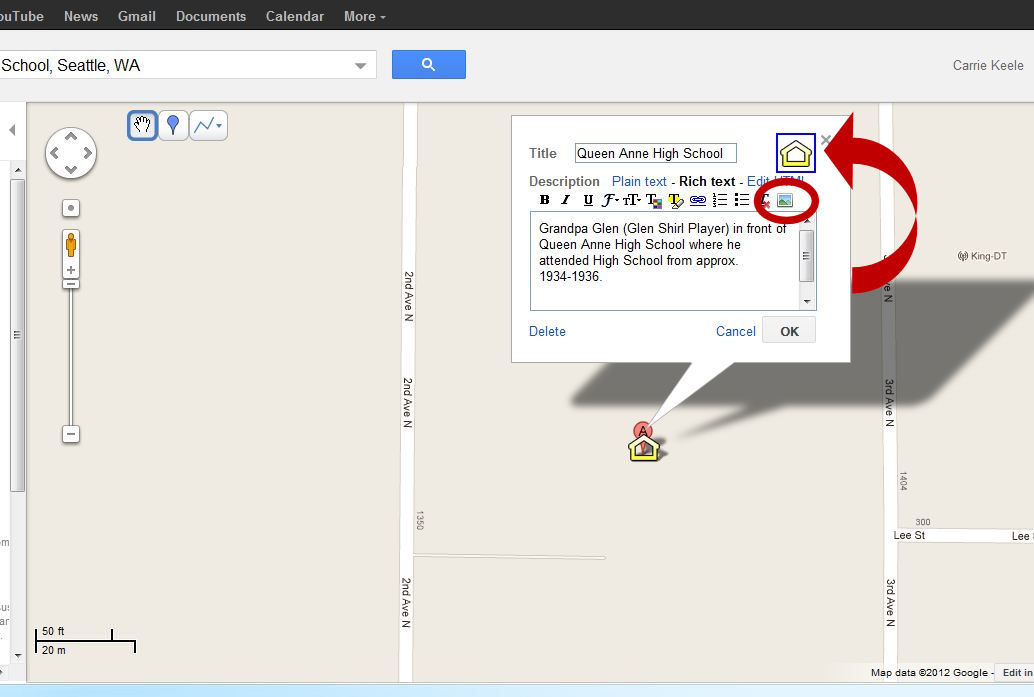
Place your pin next to the original Google maps pin. A window will pop up allowing you to add some details. You can change to look of the pin (here I changed the pin to a yellow school house) by clicking on the icon and selecting from the available icons. You can type text using "plain text", but I prefer using "rich text" format since it gives you more options. Once you have the text you would like, you can add a picture by clicking picture icon (circled below):

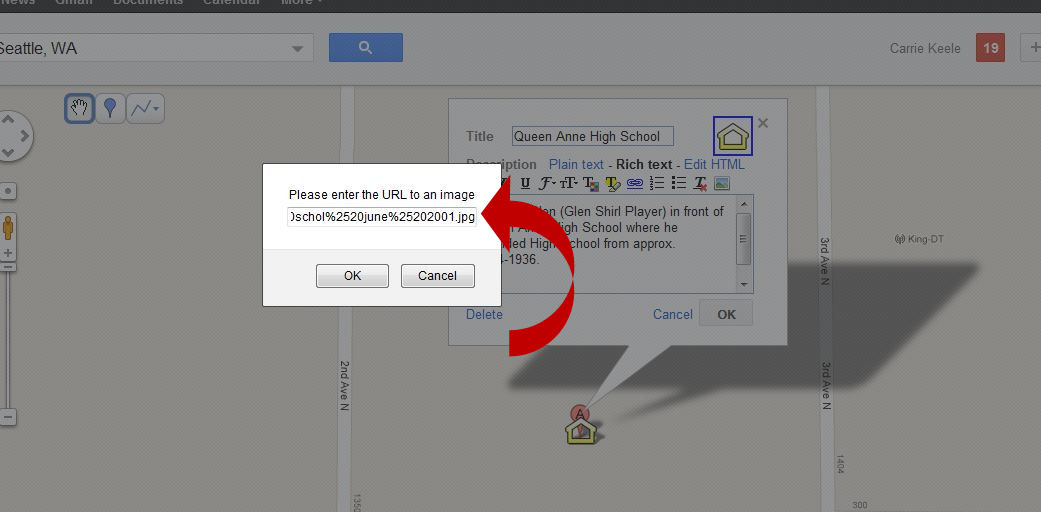
Copy the URL of the picture you are using into this box. Note: You cannot upload a picture directly from your computer. You can use your own website or a free picture hosting site. In this example I used Picasa, which is also a Google product. Make sure the link is directly to the picture, not a webpage. I usually right-click the picture and select "Copy Image Location" to ensure I have the proper link.

You will see that the picture now shows up in the white box. One of the restrictions I noticed, is that within your custom map, you can't make these pictures bigger. I like to have details and be able to zoom in. So, I opt to link this picture to my Picasa album where they can view the full picture, save it, print it, etc. Simply click on the picture and then click the "link" button (looks like a chain link):

From here copy the URL to the web location of the picture. For this example, I used the URL to my Picasa album that shows this picture (rather than the image location). This will give me the ability to see all pictures in the album, not just the one picture.

Once you have all the information added, click the "OK" button, then click "Save". Now click "done" to see what your custom map now looks like:

Here you can see that our new pin now shows up in the list. Make sure to check to see if you image link works correctly.

If you'd like to take a close look at what I have added to my map, here it is: My Custom Map.

You can create different maps for ancestors, time periods or locations. Imagine sharing this with your family and inviting them to share their pictures & stories. My 6 year old son, Braden, thinks that maps are the coolest thing (he collects maps from the local malls & often will navigate to the next store when we are shopping!) ... I can't wait to share my custom map with him & tell him stories about Grandpa Glen!

Carrie Keele
(a.k.a. DearMYRTLE's daughter)
www.NotYourMothersGenealogy.com

1940 Census - Now what? Follow up webinar

Have you been having fun with the 1940 Census release?? Feeling a little overwhelmed? Did you love DearMYRTLE's webinars last week so much and you're going through withdrawal this week?

1940 Census UPDATE: What to do with this now? with DearMYRTLE, Your friend in genealogy,
Carrie Keele, Not Your Mother's Genealogy
& Cousin Russ Worthington, FTM Users Blog & A Worthington Weblog

REGISTER for this webinar:
https://www1.gotomeeting.com/register/718893264

9pm Eastern US
8pm Central US
7pm Mountain US
6pm Pacific US

If you need a time zone converter, there is a great one located here:
http://www.timeanddate.com/worldclock/converter.html


System Requirements
PC-based attendees
Required: Windows® 7, Vista, XP or 2003 Server
 

Macintosh®-based attendees
Required: Mac OS® X 10.5 or newer


iPad users may download the GoToMeeting App in the App Store.
 

There is also an app for Android.

BE SURE to use the #DearMYRTLE on twitter for posing questions during the webinar, and to continue the conversation beyond the confines of our 90 minute discussion. You can find me on twitter: @CarrieKeele


Carrie Keele
(a.k.a. "DearMYRTLE's daughter)
www.NotYourMothersGenealogy.com